Skanpage
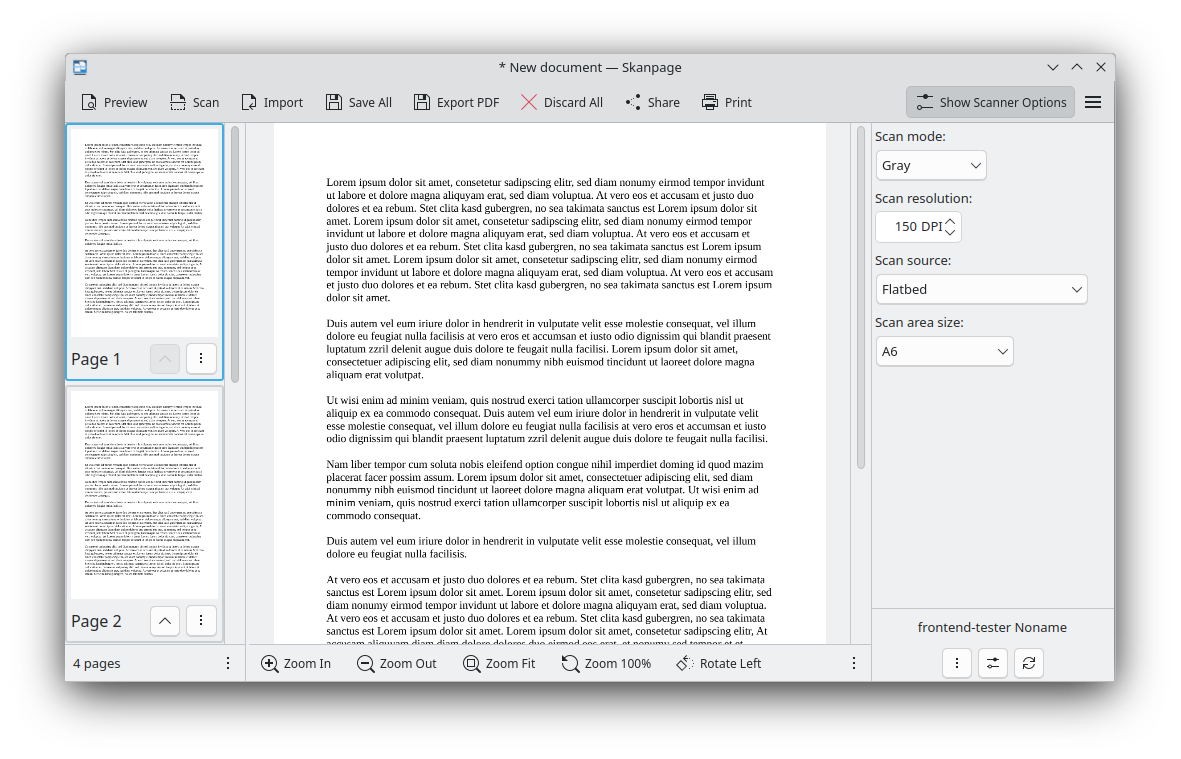
Discover Skanpage, a streamlined Linux tool designed for effortless multi-page document scanning. Read our review of its features and usability.
The Perfect Solution for Piles of Paperwork
Imagine you have a stack of multi-page contracts, receipts, or hand-drawn sketches sitting on your desk, and you need to digitize them quickly. Manually scanning each page, saving them individually, and then finding a third-party tool to merge them into a single PDF is a tedious chore. This is where Skanpage multi-page document scanning comes to the rescue. Developed by the trusted team at KDE for the Linux platform, this utility is built specifically to make bulk digitizing projects as painless as possible.
Streamlined Features for Efficient Digitization
Unlike overly complex imaging software that clutter your screen with unnecessary editing tools, Skanpage focuses on doing one job exceptionally well. Here is what makes it a standout choice for Linux users:
- Versatile Hardware Support: Whether you are utilizing a standard flatbed scanner for delicate photos or an Automatic Document Feeder (ADF) for rapid-fire document scanning, this application interfaces seamlessly with your hardware.
- Advanced Device Configuration: You can adjust and configure your scanning device options directly within the application to ensure optimal resolution and contrast before you begin.
- Intuitive Page Management: Once your pages are scanned, you can easily reorder, rotate, or delete individual pages within the workspace before finalized saving.
- Flexible Export Formats: Save your completed scans as cohesive multi-page PDF documents or as individual high-quality image files depending on your project needs.
Who Is This Scanning Tool For?
Skanpage is an ideal match for Linux desktop users who require a clean, distraction-free environment. If you frequently handle administrative tasks, academic research papers, or household archiving, the simplicity of Skanpage multi-page document scanning will save you valuable time. Its integration within the KDE ecosystem ensures it remains lightweight, fast, and highly reliable.
Getting Started
If you are ready to declutter your physical workspace and transition to a highly organized digital filing cabinet, this utility is highly recommended. To explore its capabilities and integrate it into your productivity workflow, head over to the official Flathub store page to get started with Skanpage today.