
Easy to use WiFi Analyzer Review
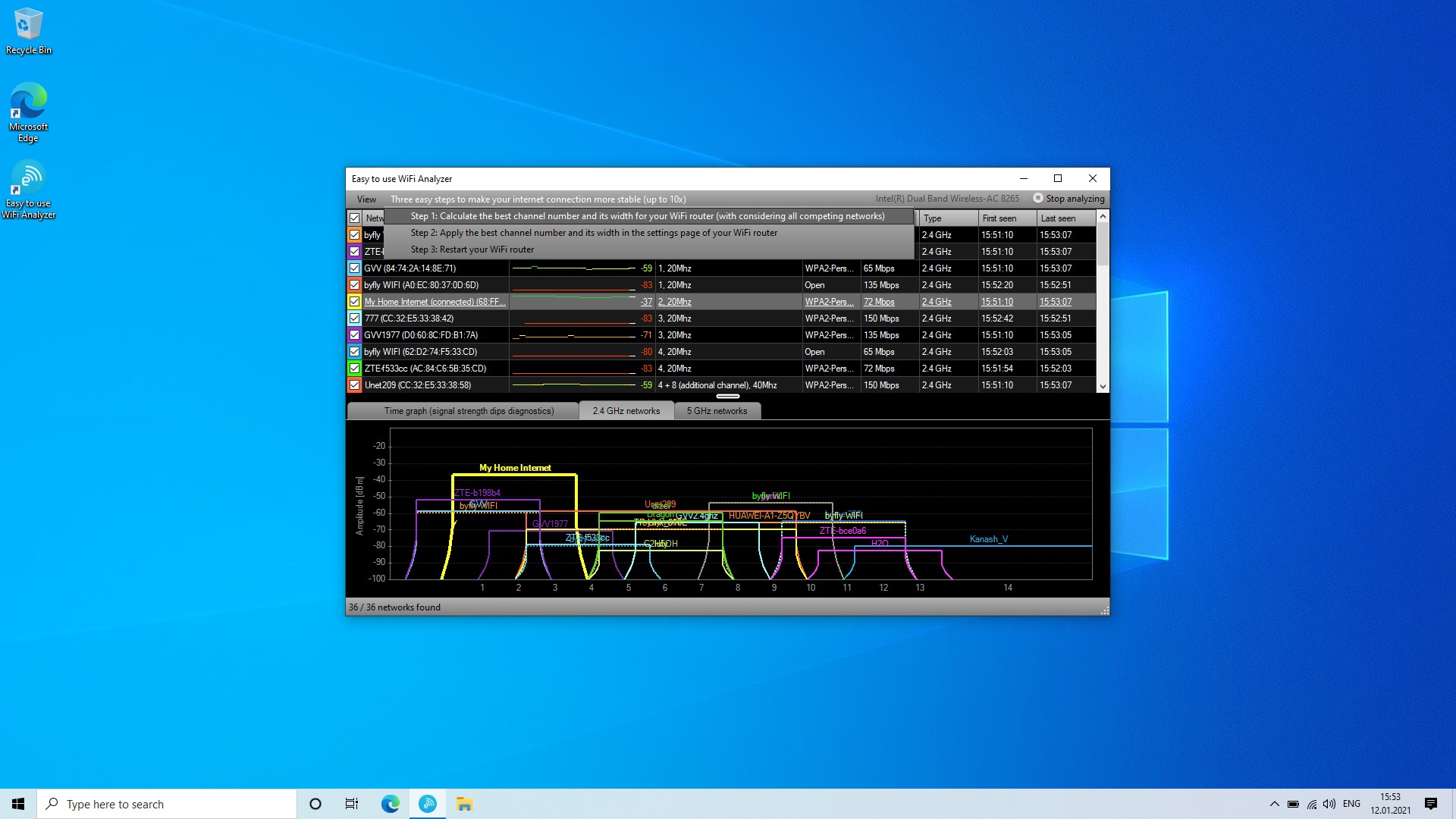
Discover how the Easy to use WiFi Analyzer app for Windows helps optimize your home network by identifying the best channels. Read our full hands-on review.
While most people immediately blame their internet service provider for sluggish speeds, the actual culprit is often wireless congestion caused by neighboring networks. The Easy to use WiFi Analyzer network diagnostic tool offers a highly practical, software-based solution to this common headache, bypassing the need for expensive hardware upgrades like repeaters or new antennas.
A Smarter Approach to Wireless Optimization
Instead of trying to boost a degraded signal with physical amplifiers, this utility helps you find and configure the cleanest path for your data. By identifying which frequencies are overcrowded and which remain open, it allows you to make informed adjustments directly within your router's administration panel.
Key Features of the Easy to use WiFi Analyzer
- Dual-Band Visualization: Separately analyze congestion across both 2.4 GHz and 5 GHz bands to find the least occupied channels.
- Signal Strength Monitoring: View real-time signal metrics for all surrounding wireless networks to understand interference patterns.
- Integrated Speed Testing: Run benchmark tests before and after making configuration changes to verify actual performance improvements.
- Streamlined Windows Interface: Designed specifically for Windows 10, providing a clean, accessible layout that requires no advanced networking expertise.
Who is This Network Tool For?
This utility is ideal for remote workers, gamers, and streaming enthusiasts experiencing unexplained dropouts or latency spikes in high-density residential areas. If you live in an apartment building or a closely packed neighborhood, the Easy to use WiFi Analyzer network utility provides the visual data needed to claim your own clear channel.
Enhance Your Connection Today
By providing clear, actionable insights into your local wireless spectrum, this software empowers you to optimize your existing setup without spending money on unnecessary hardware. To explore its features and diagnostic capabilities on your own device, head over to the official Microsoft Store to view the application listing.